
Well you already learn about TEXT TOOL in my previous tutorials Text reflection effect and Create a shadow effect. Now sometimes you feel that, you want only single word or single letter. In this tutorial you will learn How to break apart of text. Yes, Corel Draw can break it.
TOP MENUBAR > ARRANGE > BREAK ARTISTIC TEXT APART
Done…

Yes now you can see your whole sentence was break apart with single word. You can select any word now.

If you select a word and repeat step 2 again you can break a word with a single letter.

You can use this trick many times during your creation and make your work easy.
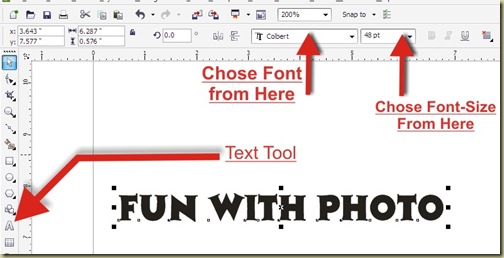
STEP 1: TEXT TOOL
Firstly, if you have any sentence (or you create it yourself like below picture) in text format.STEP 2: Break apart (CTRL + K)
Now select whole sentence and follow these steps.TOP MENUBAR > ARRANGE > BREAK ARTISTIC TEXT APART
Done…

Yes now you can see your whole sentence was break apart with single word. You can select any word now.

If you select a word and repeat step 2 again you can break a word with a single letter.

You can use this trick many times during your creation and make your work easy.


